A short journey through position property in CSS
CSS has lots of layout skills to master. position, float, multi-column, flexbox. Sometimes you can use them as you like, but sometimes you should choose wisely according to the situation. Let’s take a look at the position property. To look over some interesting behaviors among the different values.
1. position: static
This name faithfully represent the behavior of his value. It is static, it is the default value. Something interesting about it is that
it will not take into account of the
topleftrightbottomproperty.
In fact, it just ignores all of them. It will just stack over each other.
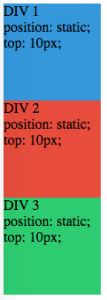
You can see it from the above picture, even you add the top property, the three blocks won’t care about it.
2. position: relative
From some aspects, you can consider position:relative is as same as position:static, why? You can see it from the picture below. Yes,
With only
position:relative, element behaves exactly likeposition:static
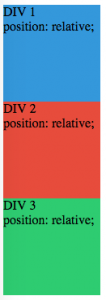
If we only assign relative to the position property. There will nothing different from the static property. The differences come from the top left right bottom property, now you can adjust a element with position:relative via these 4 properties. We can see from picture below.
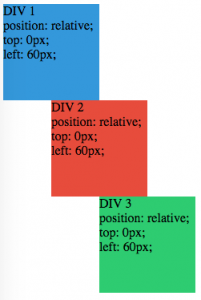
It also reveals an interesting fact that:
position:relativemeans relative to its own original position.
The above picture has explained it fact well.
The third interesting thing about position:relative is that **it creates a coordinating system for its position:absolute children. **The children inside with position:absolute will position itself using their outside position:relativecontainer as origin.** We’ll talk it more in the next section :)
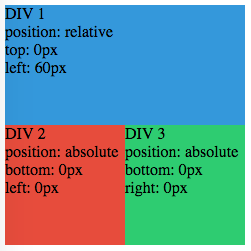
3. position:absolute
You might think this should be an easy one. Elements with this property will consider top bottom left right properties. And position themselves exactly to the place where the 4 offset properties sets. But it is very very interesting also.
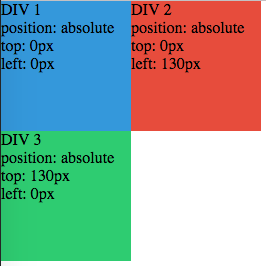
A tip here is that the element with
position:absolutewill be taken out the document flow completely!
No, not like float, not like it at all. float is a property which make element not being a part of the normal document flow, they can still affect the position of element around it. Element with position:absolute will be a stranger to all the rest elements in the DOM, they don’t care it, and it will not care them also.
Let’s add a first DIV to the flow. Just a plain DIV with height, width and background-color.
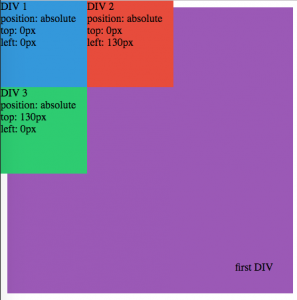
Wow, how crude they are. I mean, all of them xD. And remember a important fact for element with position:absolute:
its initial origin is HTML element in the DOM.
Yes, Even If you put them into another plain DIV element, they will still follow their belief regardless of their parents. Let’s put them into that first DIV.
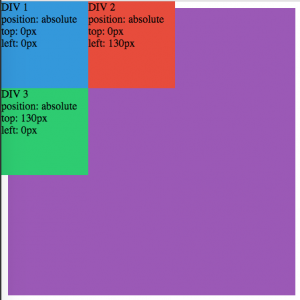
This is totally crude! Let’s teach them some manner xD. Let’s add position:relative to that first div.
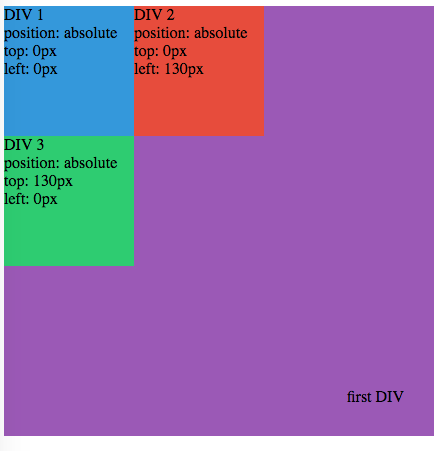
Wow, now they know how to follow the rules:
Element with
position:absolutewill take their parent container as their origin only if their parent container has aposition:relative. If not, they will use HTML tag as its initial origin,
But it is not over. Not yet. Final interesting fact about position:absolute is:
You can use this property to stretch an element without setting its
widthorheightproperty.
Let’s see it in action.
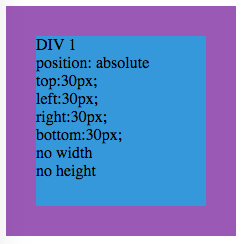
And it is very easy to understand, right? it fits your requirements very well, and naturally stretch itself to fit requirements.
4. position:fixed
Finally we can deal with something ordinary.
A element with
position:fixedwill positioned relative to the viewport. So it always stays there even if you scroll the page.
Just a caveat here:
Remember to set the padding of contents element. Otherwise the element with position:fixed will make some contents can’t be read since it just stay in your reading flow.
5. End of story
That’s it. Hope it will give you a good brief about the position property in CSS. Thanks for reading!
Thanks for reading!
Follow me (albertgao) on twitter, if you want to hear more about my interesting ideas.